Download the Full PDF
Monitor and visualise AD risk in one dashboard.
In this guide, we bundled the identity controls that apply to Active Directory. Moreover, this set of controls has proven to be applicable to the majority of organisations. The guide is written for IAM, IT, and security professionals — it is not limited to any organisational size, structure, or industry.
✔️ What is a risk cockpit?
✔️ Why use the NIST framework?
✔️ Why focus on Active Directory?
✔️ The 6 essential steps to build a risk cockpit
Why a Risk Cockpit is Essential
In a business and IT context, there is only one constant: change. Hybrid IT landscapes keep on evolving, tens or even hundreds of systems and applications need updates on a regular basis, and the number of temporary contractors keeps growing.
If you cannot see all the users across your IT environment and do not know what applications and data each of those users can access, you are essentially flying blind. A risk cockpit gives your IT team an easy way to detect and reduce risks — and helps you pass your next audit faster.
In many organisations, information security audits and identity controls are still based on spreadsheets. This is very time-consuming and cumbersome, and often leads to inaccurate results and wrong decisions. A proper risk cockpit replaces this with automated, continuous monitoring.
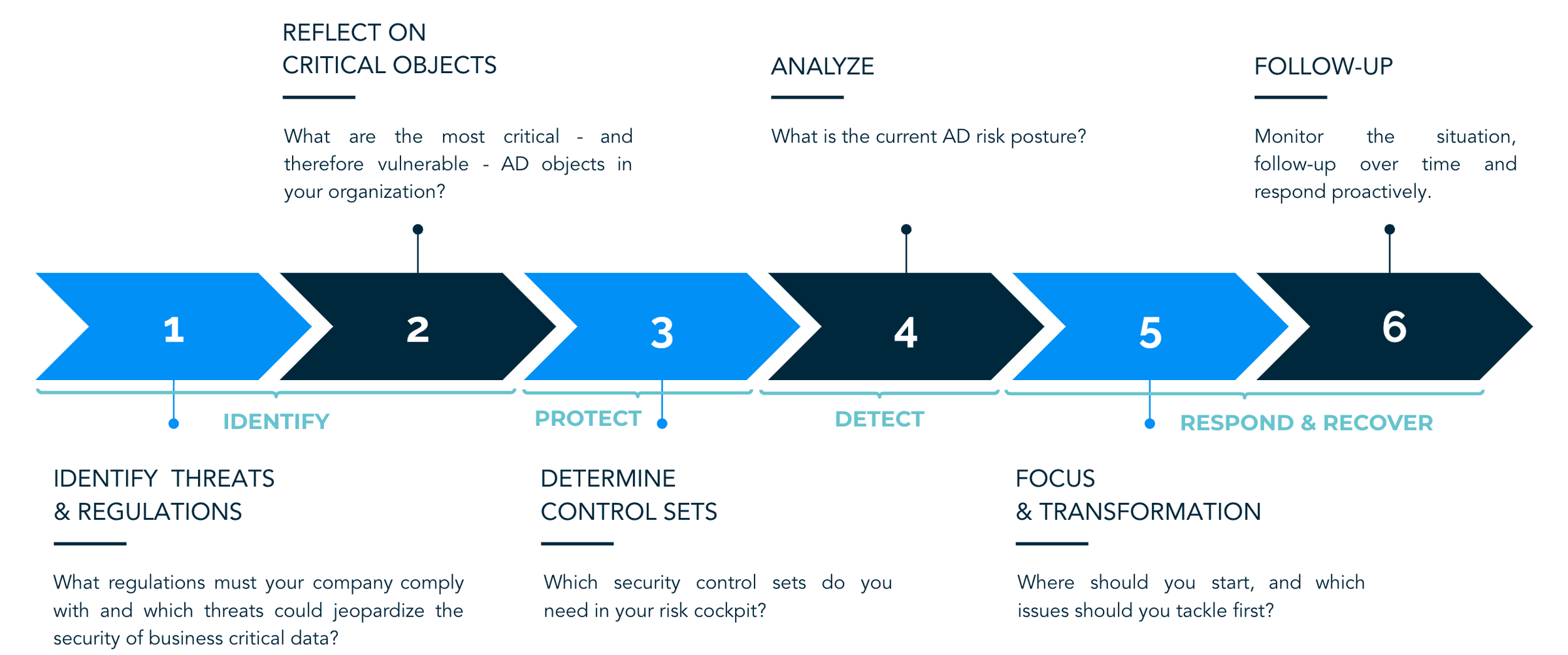
The 6 Steps to Build a Risk Cockpit
Step 1: Understand Your Business & Regulatory Context
"What regulations must your company comply with and which threats could jeopardise the security of business-critical data?" Understanding the business and regulatory context you are operating in allows you to align your risk management strategy with your business needs and set the right priorities.
Regulations concerning information security — such as GDPR, NIS 2, and ISO 27001 — force companies to take certain measures to protect personal and sensitive data. For many organisations, striving for compliance is an important driver to improve their security processes and controls.
Step 2: Identify Critical AD Objects
"What are the most critical — and therefore vulnerable — AD objects in your organisation?" Before setting up the relevant control sets, it is important to know which groups, and therefore which user accounts, are critical for the mission and security of your organisation.
Once default critical groups are identified, evaluate whether they are actually critical and actively used. Additionally, identify any custom groups and check their relevance against your business and regulatory context.
Step 3: Define Your Control Sets
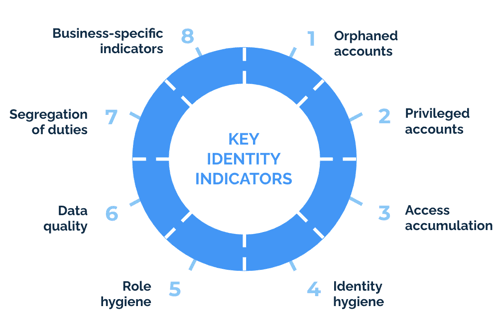
"Which security control sets do you need in your risk cockpit?" The ISO 27001 based identity wheel shows eight control sets that are applicable for the majority of modern organisations: orphaned accounts, privileged accounts, excessive permissions, separation of duties, access reviews, role hygiene, user hygiene, and data quality.
Step 4: Analyse the Current State
"What is the current AD risk posture?" Before analysing the security control sets, look at the current identity repository size to know what is out there. Start with a general overview of the number of users, groups, and service accounts. Then analyse each control set to find orphaned accounts, over-privileged users, toxic combinations, and other risks.
Note that specific user accounts or groups within a control can be riskier than others. An inactive admin account is more dangerous than an inactive standard user. Document the main findings to support decision-making in the next step.
Step 5: Set Priorities and Build a Roadmap
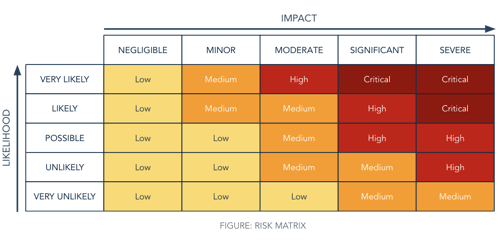
"Where should you start, and which issues should you tackle first?" Based on the results and indicated risk levels, set up a roadmap of control projects to secure your AD environment. Use a risk matrix — combining likelihood and impact — to prioritise the most pressing issues.
Include control projects that address the highest-risk issues early in the roadmap. Once a control project is started, track progress so you can measure whether you are still on track and report the current situation to management.
Step 6: Monitor and Follow Up
"Monitor the situation, follow up over time, and respond proactively." It is not because a control set is under control now that it will remain so in the future. People join and leave the company and move across departments all the time. Companies may go through mergers or acquisitions. The regulatory landscape is also continuously changing.
Keep on monitoring these controls and react promptly when any relevant changes occur. This way, you can better manage information security risks and prevent threats before they materialise.
The AD Control Sets in Detail
Orphaned Accounts
Would you ever leave for a vacation and leave your front door unlocked? Still, this is equivalent to what organisations do when they leave orphaned accounts hanging around. When an employee leaves or a contractor's project ends, their accounts must be deactivated without further delay.
Within AD there are two key indicators to detect orphaned accounts:
- Accounts that have not been used for a long time (e.g. 90+ days since last login)
- Accounts that have never been logged into
Additionally, look for accounts with no correlated HR record — these are often accounts for employees who have already left the organisation.
Privileged Accounts
Privileged accounts give significant access to resources and can change or disable security systems. Key categories to monitor include: standard administrator accounts, accounts with administrative rights not labelled as such, privileged service accounts, and shared non-personal accounts. The objective is to minimise the number of privileged accounts and ensure each one is actively monitored.
Excessive Permissions & Least Privilege
Users accumulate permissions over time — especially when they move between departments. If no one reviews and removes old access rights, users end up with permissions they no longer need. Apply the principle of least privilege: grant only the minimum access required for someone to do their job.
Ready to apply this to your environment?
Book a 20-minute call with our team — we'll walk you through Elimity Insights on your own scenarios. No pressure.